Send invoices to KSeF
Systemate can handle invoices in several ways — from generating them locally to delegating the issuing to an external provider (the full list is in Set your logo and invoice details). Delivery to KSeF — Krajowy System e-Faktur, the Polish national e-invoicing system — is available through the inFakt integration: inFakt issues the invoice and submits it to KSeF, and Systemate shows you the status of every invoice along the way.
Before you start
Section titled “Before you start”Everything KSeF-related happens on your inFakt account, so prepare it first:
- Create an inFakt account and fill in your company data. If your business is VAT-exempt, pick the exemption reason in the inFakt settings — otherwise invoices with the “zw” rate will not generate correctly.
- Activate the KSeF integration on your inFakt account, following inFakt’s instructions.
- Generate an API key with the
api:invoices:read, api:invoices:writepermissions and copy it — Systemate will need it in the next step.
Turn on sending to KSeF
Section titled “Turn on sending to KSeF”-
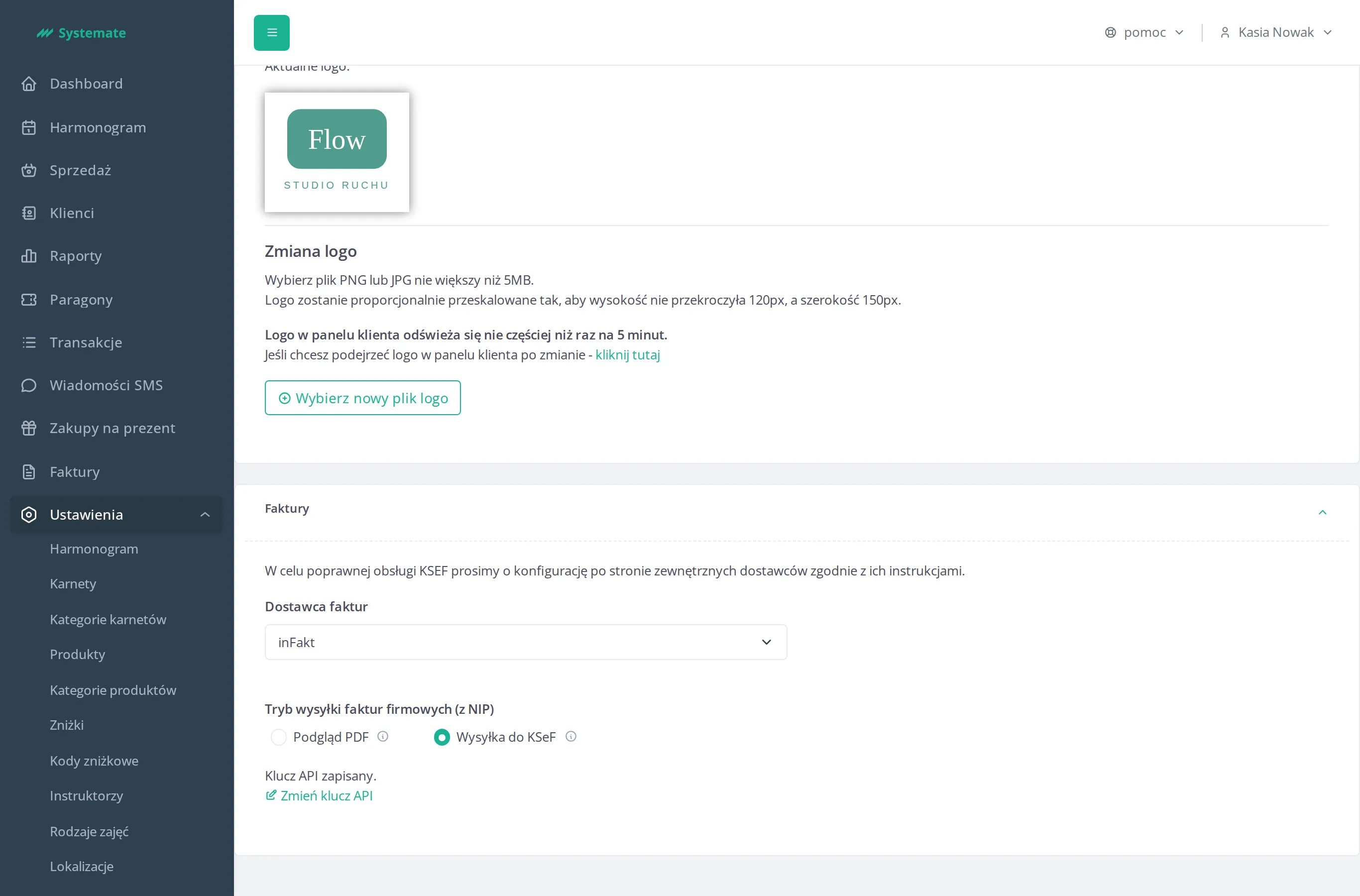
In the office panel go to Settings → Configuration and find the “Faktury” (Invoices) section. If your studio has more than one seller, each seller has its own settings.
-
Pick inFakt in the provider dropdown (“Dostawca faktur”).
-
Paste your key into the API key field (“Klucz API”), click the test button (“Testuj integrację”) to confirm the connection works, then save (“Zapisz”).
-
Switch the send mode for company invoices — “Tryb wysyłki faktur firmowych (z NIP)” — to sending to KSeF (“Wysyłka do KSeF”). The choice saves automatically, but first Systemate verifies with inFakt that the KSeF integration is active on your account. If it is not, you will see a message asking you to activate KSeF in the inFakt settings and try again.
What happens with each invoice
Section titled “What happens with each invoice”- Company invoices (buyer with a tax number) are issued in inFakt and submitted to KSeF. The buyer gets an e-mail saying the invoice is available in KSeF — the structured invoice in KSeF is the authoritative document.
- Invoices for private individuals (no tax number) are unaffected: the customer keeps receiving an e-mail with the invoice as a PDF.
- inFakt submits invoices to KSeF in batches, so it can take up to about one business day before an invoice shows up in KSeF.
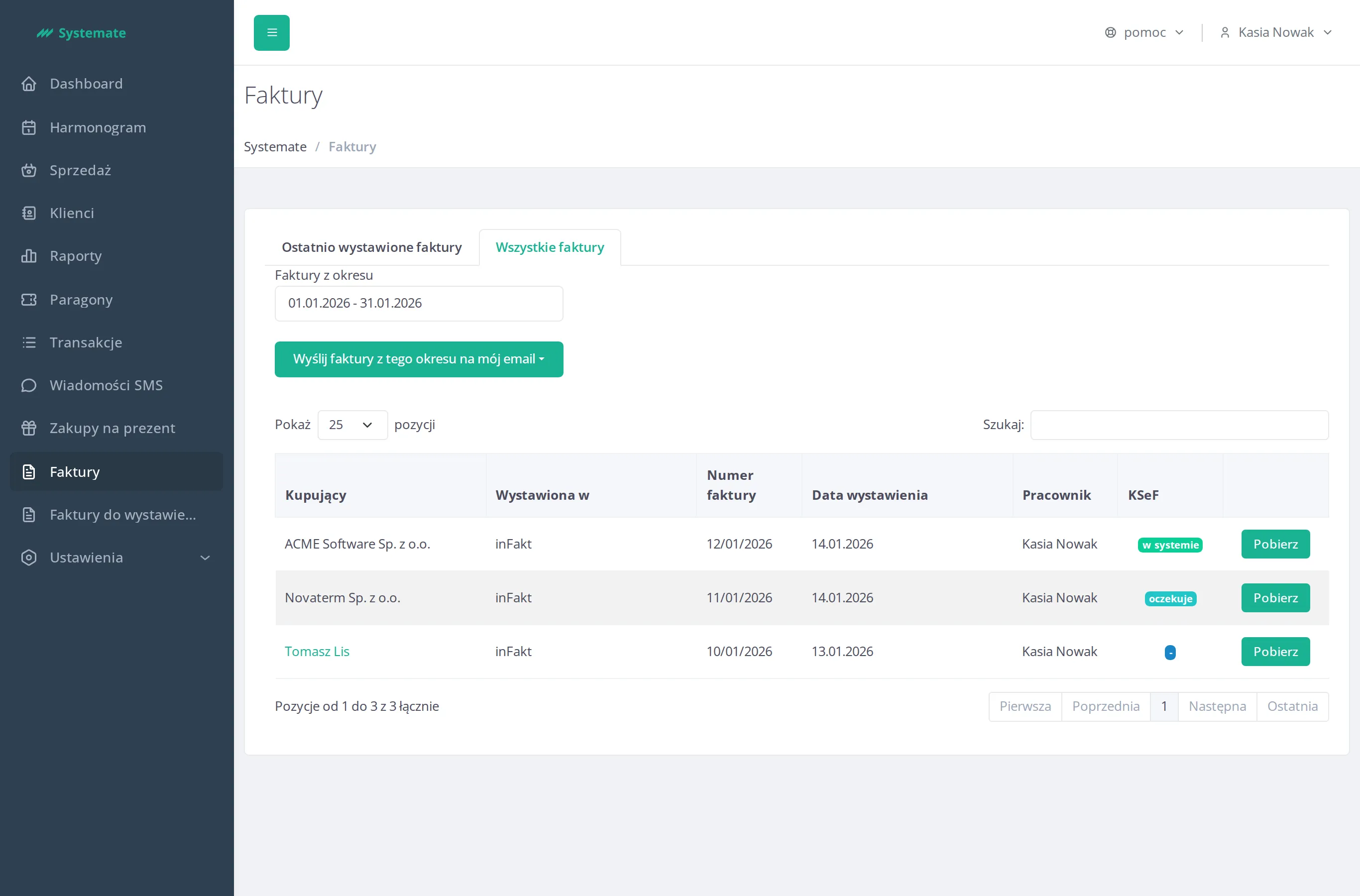
You can follow every invoice in the Invoices view — the KSeF column shows a status badge: “-” (not sent to KSeF), “oczekuje” (waiting to be submitted), “wysłana” (submitted, waiting for KSeF confirmation), “w systemie” (accepted — the invoice is in KSeF), or “błąd” (submission failed).
If a submission fails, Systemate notifies your studio’s administrator by e-mail. Check the invoice on your inFakt account, and if the cause is not clear, contact support.