Sell a pass at the front desk
-
In the office panel go to Sale.
-
In the search box (Search for article or pass…) type a name and select the pass or product from the list.
-
For a pass, fill in the form that opens:
- Buy as a gift — yes or no,
- Client — search by name (min. 3 characters) or card number,
- Validity start — from date (then pick a Valid from date) or from next visit (select later).
Click Add to place the pass in the order.
-
For a product, it’s added to the order straight away. Click Edit discount next to its price to apply a discount.
-
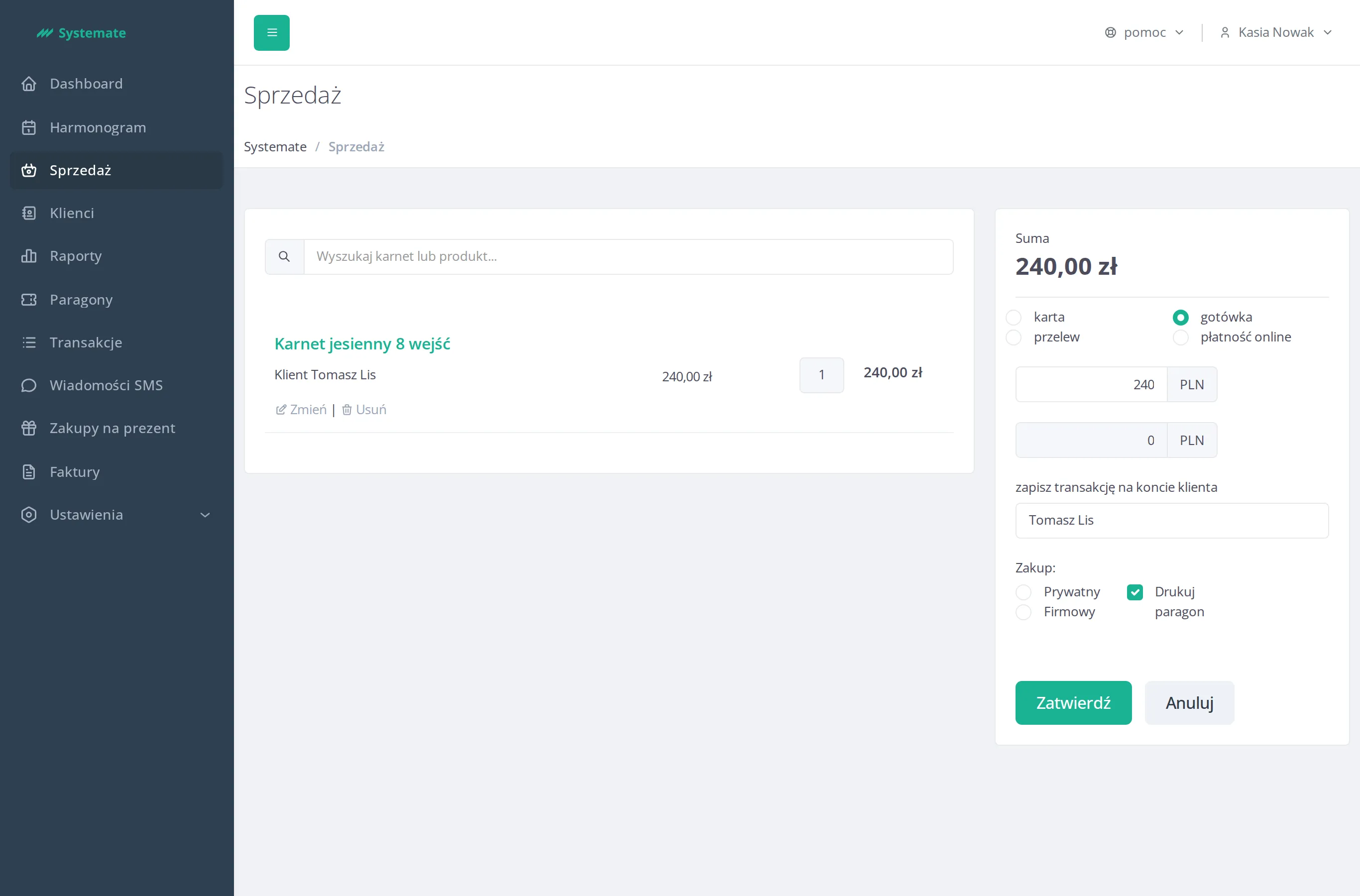
Choose a payment method — card, cash, bank transfer, or online payment — and enter the amount received in the payment field. Systemate calculates the change automatically.
-
If the order isn’t fully paid, contains a pass bought as a gift, or is invoiced to a company, search for the Client under Assign transaction to client account.
-
Set Purchase as: individual or company, and check print receipt if the customer wants one.
-
Click Confirm to complete the sale.