Marek runs a weekend workshop
Marek Wiśniewski has booked a guest instructor for an acro-yoga weekend at Studio Ruchu Flow — two sessions, Saturday and Sunday. It’s a one-off event, not a regular class, so he sets it up as a workshop.
1. Marek sets up the workshop
Section titled “1. Marek sets up the workshop”The guest isn’t in the system yet, so Marek first adds her in Settings → Instructors — see Add an instructor.
Then he opens Settings → Workshops and clicks Add. He names the workshop, adds the two classes in the Classes section — Saturday and Sunday, each with the guest as Instructor, the Location, the hours, and a Capacity — and defines one weekend ticket in the Passes section with its Price gross and a Sale period. He leaves the ticket’s Visibility as Everywhere, so it sells online too, and clicks Save.
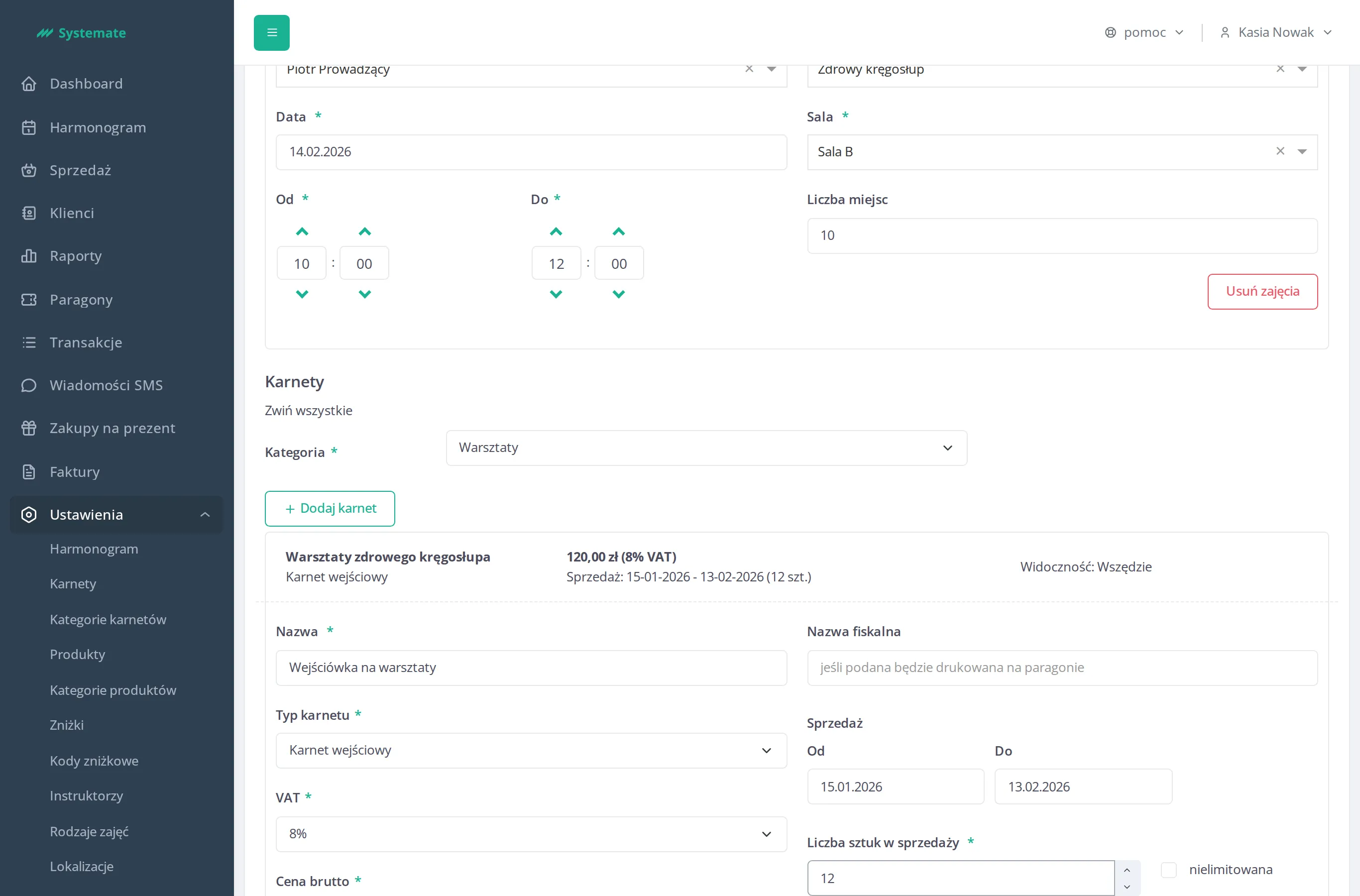
Step by step: Set up a workshop.
2. Customers find it and tickets start selling
Section titled “2. Customers find it and tickets start selling”In the customer panel the workshop shows up among the Upcoming events and in the offer — a tile with the event dates and the ticket price. A customer clicks Buy, pays online, and that purchase is their entry: a weekend ticket valid for all workshop classes signs the buyer up for both sessions automatically.
What the customer sees: Take part in a workshop.
3. The Sunday hour changes — Marek edits the workshop
Section titled “3. The Sunday hour changes — Marek edits the workshop”A week before the event the guest asks to move the Sunday session an hour later. Marek goes back to Settings → Workshops and clicks Edit.
Tickets have already sold, so the Sunday class has participants on its attendance list — the form warns him that editing is limited and locks the class’s date and hours. Marek first removes the participants from the Sunday attendance list (see Check the attendance list), changes the hours, clicks Save, and signs everyone back in — see Sign a customer up for a class. If he only needed to swap the Instructor or adjust the Capacity, no unlocking would be needed.
The full editing rules: Set up a workshop — Edit a workshop.
4. He watches how the tickets sell
Section titled “4. He watches how the tickets sell”In Reports Marek opens the Workshops report. Under “Active and ongoing workshops” he finds the acro-yoga weekend with its list of sold passes — who bought a ticket, when, and for how much.
Step by step: Browse the reports.
The result: the workshop is live and selling online, the Sunday time change went out without losing a single participant, and Marek can see ticket sales in one report.