Marek connects tpay
Marek Wiśniewski wants the customers of Studio Ruchu Flow to pay online for single passes and outstanding balances. Stripe already handles subscriptions, but one-off payments go through tpay — into the studio’s own account. Marek’s contract, fees and payouts are directly with tpay; Systemate is only a technical partner.
1. Two paths on the tpay card
Section titled “1. Two paths on the tpay card”Marek opens Ustawienia → Płatności (Settings → Payments). Below the Stripe – subskrypcje card there is the tpay – płatności jednorazowe card with two options:
- Nie mam konta tpay (I don’t have a tpay account) — Systemate creates the account with the company’s data. The tpay account e-mail field is already filled in, and the company data that will be sent to tpay is shown below it.
- Mam już konto tpay (I already have a tpay account) — enter the merchant ID and the security code. You find both in the tpay Merchant Panel under Ustawienia → Powiadomienia → Zabezpieczenia (Settings → Notifications → Security). The data stays on this Systemate instance only.
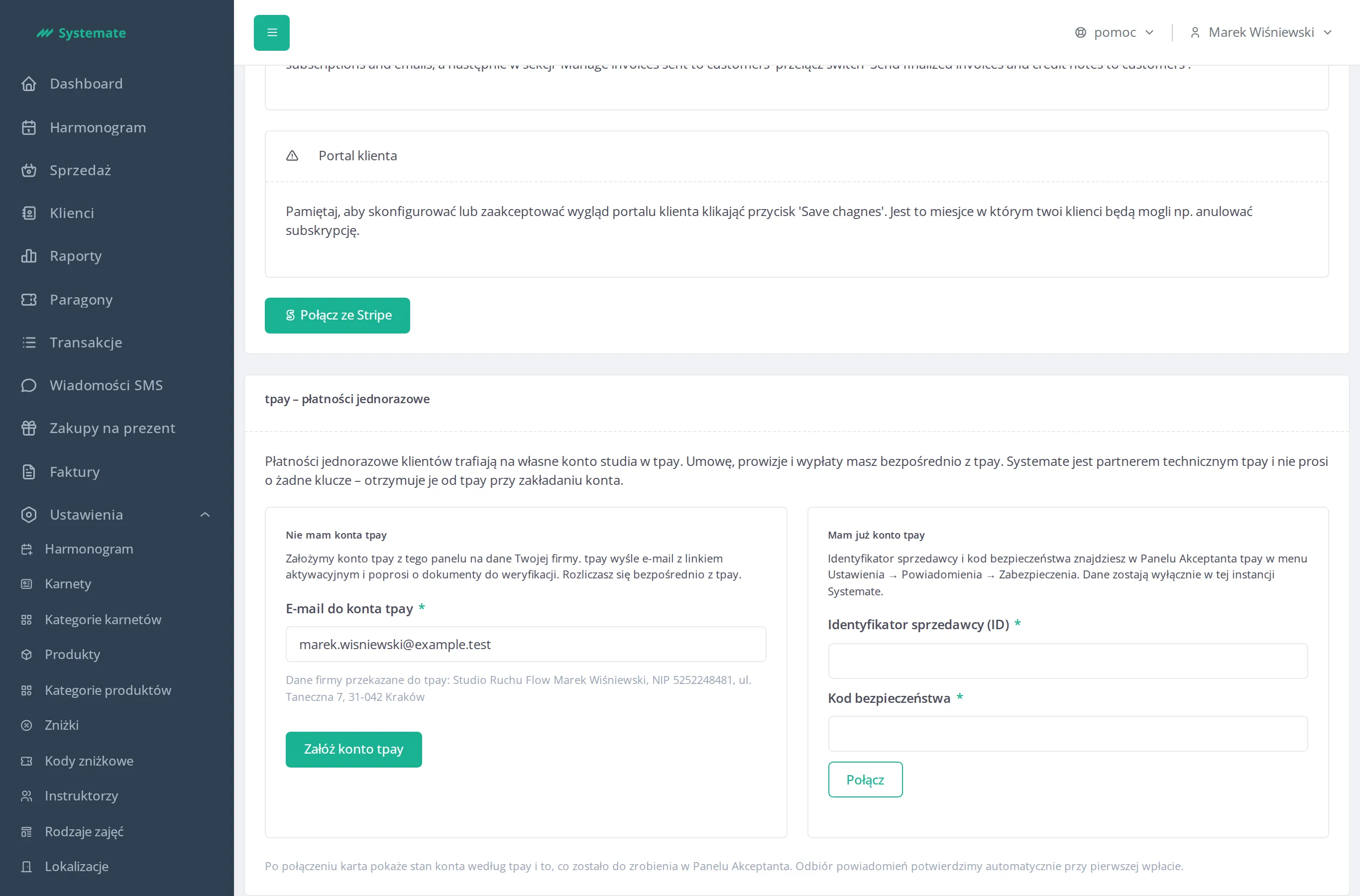
The studio has no account yet, so Marek checks the e-mail and clicks Załóż konto tpay (Create a tpay account). If tpay rejects the request, the card shows tpay’s message; if the account was created anyway, a Sprawdź stan (Check status) button next to the message completes the connection.
2. The account is being activated
Section titled “2. The account is being activated”The card immediately shows the connected account with the w trakcie aktywacji (activation in progress) badge: the company name, the merchant ID, the account state according to tpay, test mode, notification delivery, and how the account was connected — by whom and when. The sprawdź ponownie (check again) link reads the current account state from tpay.
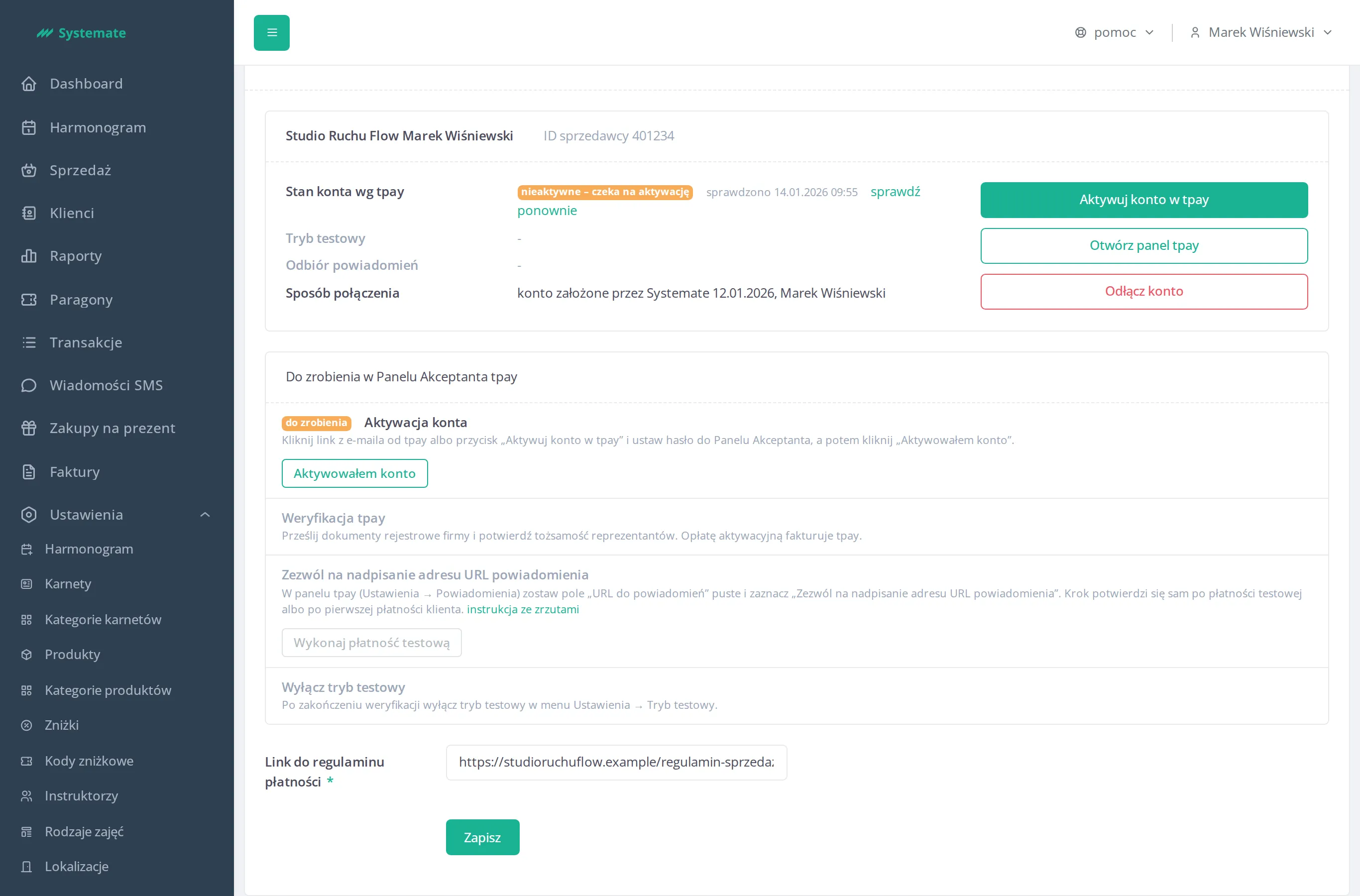
Below the account card is the list Do zrobienia w Panelu Akceptanta tpay (To do in the tpay Merchant Panel). Marek works through it in order. Until the account is active, the steps after activation and the Tryb testowy (Test mode) and Odbiór powiadomień (Notification receipt) fields on the account card are greyed out with no status, and the test payment button is disabled:
- Account activation — he clicks Aktywuj konto w tpay (Activate the account in tpay), or the link in tpay’s e-mail, and sets the Merchant Panel password. Then he goes back to the card and clicks Aktywowałem konto (I have activated the account) in this row — tpay does not tell Systemate about the activation, so Marek confirms it himself. The step turns zrobione (done), and the following steps and the account card fields unlock.
- tpay verification — he uploads the company’s registration documents and confirms the representatives’ identity. tpay invoices the activation fee.
- Allow the notification URL to be overridden — described below.
- Disable test mode — after verification he turns test mode off under Ustawienia → Tryb testowy (Settings → Test mode). While it is on, customer payments are simulated.
Allow the notification URL to be overridden
Section titled “Allow the notification URL to be overridden”This is the one step tpay does not let us do for you, and without it Systemate never learns about payments. In the tpay Merchant Panel:
- Open Ustawienia → Powiadomienia (Settings → Notifications).
- In the URL do powiadomień (notification URL) section, leave the address field empty.
- Tick Zezwól na nadpisanie adresu URL powiadomienia (Allow the notification URL to be overridden) and save.
Systemate sends the notification address with every payment — tpay uses it only when overriding is allowed.
The step confirms itself — after a test payment or after the first customer payment:
- Test payment — while the step is not confirmed and the tpay account is in test mode (or the instance connects to tpay’s test gateway), the row has the button Wykonaj płatność testową (Make a test payment). It takes you to tpay’s payment page for 1.00 zł; once paid, tpay returns to Ustawienia → Płatności (Settings → Payments), and when the notification arrives the step changes to potwierdzone (confirmed). No money moves in test mode.
- Account in production mode — there is no button, because the payment would be real. The row says the status will update after a customer’s first pass purchase. To check it right away, turn test mode on in the tpay panel (Ustawienia → Tryb testowy, Settings → Test mode) and click sprawdź ponownie (check again) — the button appears.
Finally Marek enters the payment terms link and clicks Zapisz (Save) — customers accept these terms when paying online.
3. The test payment or the first payment confirms the connection
Section titled “3. The test payment or the first payment confirms the connection”Marek makes the test payment, and the next day Ania pays an outstanding balance online. Once tpay notifies Systemate about the first of these payments, the notification delivery row changes to potwierdzony (confirmed) with the date and the transaction number, and the card’s badge to Połączono (Connected). Every row of the list is ticked off.
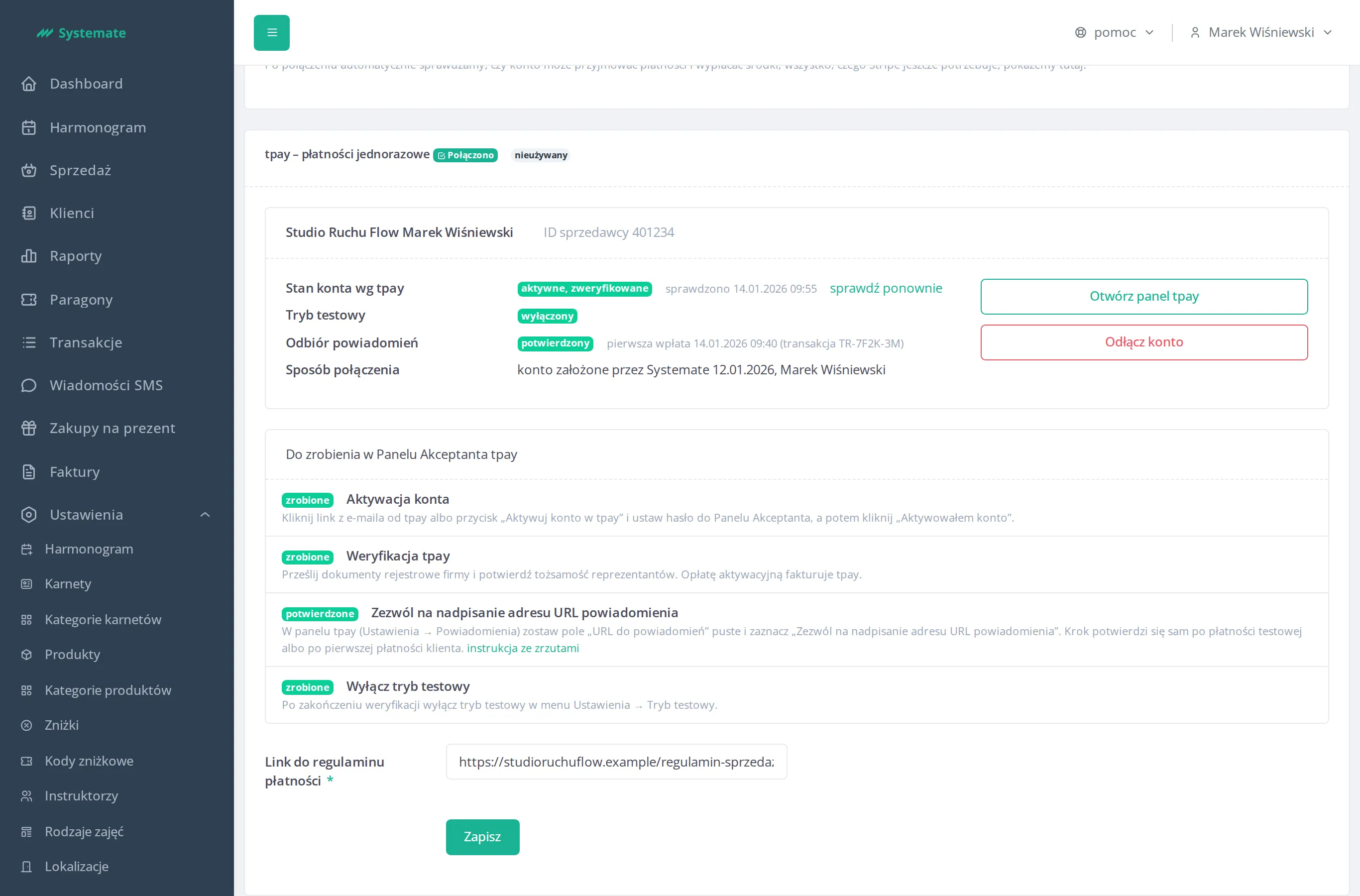
Otwórz panel tpay (Open the tpay panel) leads to the Merchant Panel, and Odłącz konto (Disconnect) — after confirmation — disconnects tpay from the studio. Disconnecting is not possible while online payments started by customers are still pending.
Result: one-off payments land in the studio’s tpay account, and the card in the panel shows what is left to do and whether tpay actually notifies us about payments. Stripe set-up for subscriptions: Set up online payments.