Activate Systemate Paragony with a Code
The installed Systemate Paragony program will only start printing your studio’s receipts after activation. You activate it using an activation code from the office panel. The program must already be installed—see Install Systemate Paragony on macOS or Install Systemate Paragony on Windows.
1. Display the code in the panel
Section titled “1. Display the code in the panel”On the computer connected to the printer, open the panel and go to Settings → Fiscal Printer. In step 2 of the wizard, click Show activation code. The wizard will display the code and its expiration time. Click Copy.
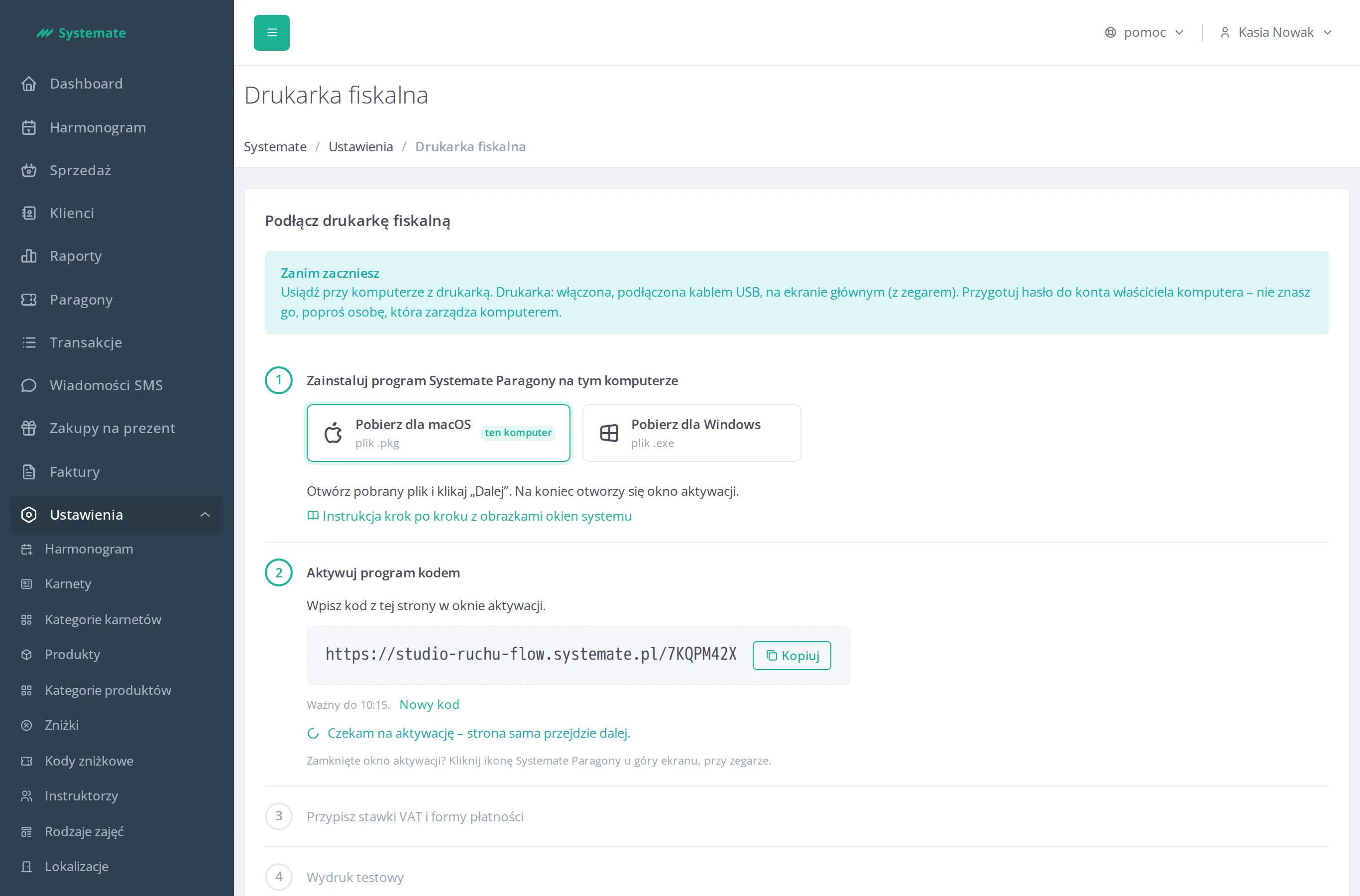
The code is valid for 15 minutes and works only once. If it has expired, click New code. The new code replaces the previous one, and the previous one stops working.
2. Click the program icon
Section titled “2. Click the program icon”Click the Systemate Paragony icon: on a Mac, at the top of the screen next to the clock; on Windows, on the taskbar next to the clock. If you don’t see it, see Find the Systemate Paragony icon.
The program’s webpage will open in your browser with the heading Aktywuj program (Activate the program). The page is in Polish only.
3. Paste the code
Section titled “3. Paste the code”Paste the entire copied code into the field on the program’s page. The code contains your studio’s address, so do not shorten it—paste it in its entirety. Click Aktywuj (Activate).
4. Check the confirmation
Section titled “4. Check the confirmation”The program page will display Program aktywowany dla studia … (Program activated for the studio …) followed by the name of your studio. Check to make sure it’s the name of your studio. Below that is the message Wróć do panelu Systemate, żeby dokończyć. To okno możesz zamknąć. (Go back to the Systemate panel to finish. You can close this window.) The page also shows where the program icon is located and searches for a printer.
5. Return to the panel
Section titled “5. Return to the panel”You don’t need to click anything on the panel: the wizard will automatically proceed to the next step once the program connects to Systemate. The next step is described on the page Assign VAT Rates and Payment Methods to the Printer.
If the program does not accept the code
Section titled “If the program does not accept the code”The program page will then display one of the following messages:
- Ten kod jest błędny, wygasł albo został już użyty. W panelu kliknij „Nowy kod” i wpisz nowy kod. (This code is wrong, has expired or has already been used. In the panel, click “New code” and enter the new code.) — In the wizard, click New code, copy the new code, and paste it again.
- To nie jest kod aktywacyjny. Skopiuj cały kod z panelu Systemate i wklej go tutaj. (This is not an activation code. Copy the whole code from the Systemate panel and paste it here.) — the pasted text is not a code or is incomplete. Click Copy in the wizard and paste the code again.
- Nie udało się połączyć z Systemate. Sprawdź internet na tym komputerze i spróbuj ponownie. (Could not connect to Systemate. Check the Internet on this computer and try again.) — the program cannot connect to the Internet. Check whether this computer has Internet access, and try again.