Install Systemate Paragony on Windows
The Systemate Paragony program prints receipts from the office panel. You install it on a Windows computer to which a fiscal printer is connected. This page walks you through every window that the system displays.
Before You Begin
Section titled “Before You Begin”- Sit down at the computer to which the fiscal printer is connected.
- Have the password for the computer owner’s account ready. If you don’t know it, ask the person who manages the computer.
1. Download the installer
Section titled “1. Download the installer”On this computer, open the office panel and go to Settings → Fiscal Printer. Click Download for Windows (.exe file). This button is labeled this computer.
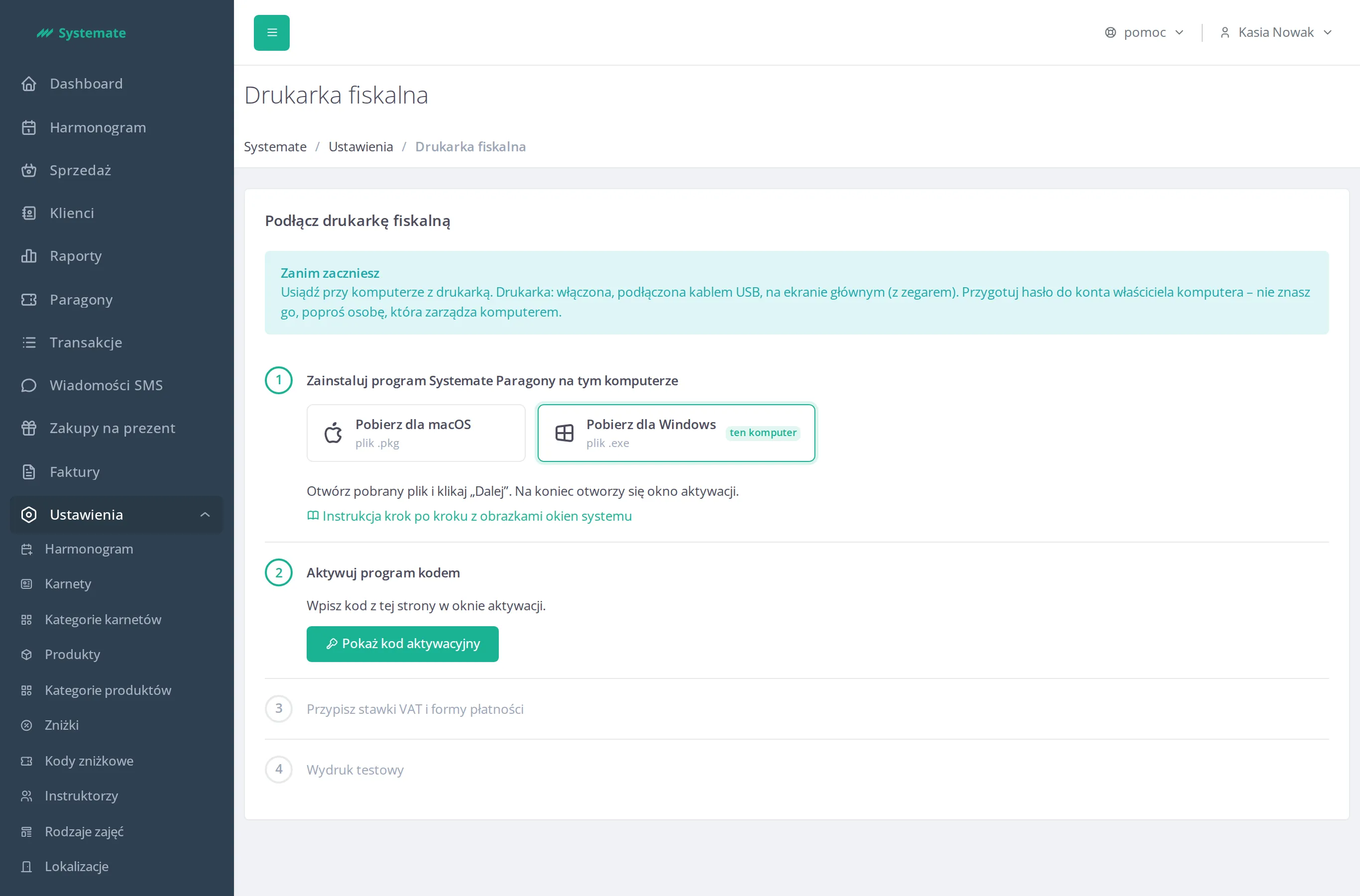
If the download buttons are grayed out, the installer is currently unavailable—report the issue in the Help menu.
2. Open the downloaded file
Section titled “2. Open the downloaded file”Open the Downloads folder and double-click the downloaded .exe file.
Windows may first display a blue window warning you that it does not yet recognize this application. The file comes from your studio’s office panel, so you can run it: click Więcej informacji (More info), then Uruchom mimo to (Run anyway). If this window does not appear, proceed to the next step.
3. Administrator Permission
Section titled “3. Administrator Permission”Windows will ask if you want to allow the program to make changes to this computer. Confirm your consent. If the account you’re using doesn’t belong to the computer’s owner, enter the computer owner’s password in the same window. This window will appear only once.
4. Go through the installer screens
Section titled “4. Go through the installer screens”The installer is in Polish and is named Systemate Paragony. It does not ask for an installation folder or any options.
- Welcome. The first page welcomes you to the Systemate Paragony installer. Click Dalej (Next).
- Starting the installation. The next page informs you that the installer is ready. Click the button to start the installation.
- Progress. The installer displays a progress bar. Please wait—you don’t need to click anything.
- Completion. The final screen informs you that the installation is complete. Close the installer using the button at the bottom of the page.
5. Result
Section titled “5. Result”The Systemate Paragony icon appears on the taskbar, next to the clock. Windows may hide it among the hidden icons under the arrow on the taskbar—see Find the Systemate Paragony icon.
Next Steps
Section titled “Next Steps”You still need to activate the program using the code from the office panel. Click the program icon on the taskbar— the activation page will open. Instructions on how to do this are provided on the page Activate Systemate Paragony with a Code.